It becomes quite evident that in cases where builders undertake projects on an individual basis and manage projects and finance independently, issues arise in terms of efficiency, time wastage, and inaccuracies in accounting.
Integration of construction project management software and accounting solutions such as 123worx has become crucial for proper cost management, better cash flow management, and real-time access to project information.
Integrating these two aspects together can help builders achieve efficiency, save time, and make data-driven decisions.
Integration will make your whole process flow much smoother, with all of your data getting seamlessly transferred between platforms. This way, builders can focus on doing great work and getting paid for it.
Builders and contractors gain greater control over projects, enjoy improved cash flow, and arm themselves with the real-time information they need to make smart decisions, not wait for weekly reports.
Quick Answer: How to Connect Construction Project Management with QuickBooks
Construction businesses can connect project management with QuickBooks by integrating their estimating, scheduling, cost tracking, and invoicing workflows into a single system.
This allows project data such as labor, materials, and subcontractor costs to automatically sync with accounting, eliminating manual entry, improving accuracy, and providing real-time visibility into project profitability.
Why Construction Businesses Need QuickBooks Integration
Contemporary construction work involves several tasks such as estimation, scheduling, cost management, and billing. In the absence of integration, these processes operate independently and can result in inefficiencies and mistakes.
Integration enables the seamless flow of project information from operations to accounting.
The Reality: Disconnected Construction Workflows
Unfortunately, many construction firms still function using a number of different programs that do not interact with each other.
Some of the tools they tend to use include:
- An estimation solution or even a spreadsheet program
- A project management platform
- QuickBooks is typically used for accounting
- Manual communication among teams and stakeholders
Although each of these programs is used to fulfill a certain purpose, such dysconnectivity causes problems.
This is a common issue in construction businesses relying on disconnected systems (read more about why disconnected systems are costing construction businesses more than they realize).
For instance, project managers usually focus on scheduling and execution, while accountants care about invoices and expenditures. Since these two platforms are not connected, all of the necessary information needs to be transferred manually between them, causing numerous inefficiencies.
Common Problems with QuickBooks and Construction Project Management
When project management and accounting systems are not connected, builders face several operational challenges:
Where Does Your Construction Workflow Start to Fail?
There are a couple of main problems that occur as a result of disconnected workflows:
Redundant Data Entry – Every bit of information that needs to be estimated in advance has to be entered twice (during the project setup phase and invoicing).
Lack of Real-Time Insight – While some data gets updated instantly, other pieces may lag for a few days, causing misalignment between your projects and finances.
Some other common issues associated with disconnected workflows include:
- Delayed invoicing due to the lack of project information
- Inconsistency of costs, as the data comes from two separate places
- Misalignment between your actual expenses and your budget
decreased productivity and profitability of your business (see how to avoid budget overruns in construction projects).
Understanding the Full Construction Workflow (And Its Weaknesses)
It makes sense to briefly overview a standard construction project workflow so that we can highlight the importance of integration.
Typically, the following phases take place:
- Estimation – creating a cost breakdown of the project
- Planning – organizing the schedule and allocating resources
- Execution – executing the work on the construction site
- Cost tracking – calculating the costs incurred during a certain period of time
- Billing – creating invoices
As we see, in a disconnected environment, each of these stages takes place separately.
Moreover, there is a need to transfer data between those phases manually, which inevitably causes problems.
For instance, the estimate may differ somewhat from the actual budget. Also, cost tracking is likely to be somewhat detached from the actual work.
Shift to an Integrated Workflow
What happens when we integrate all of those phases? We obtain a completely new workflow that consists of interconnected processes.
Such a workflow may go as follows:
Project estimates are automatically converted into budgets and projects
- Project update automatically affects the related costs and financial data
- Financial information stays fully in line with the project’s current status
As a result, you receive a unified system that is going to facilitate all of your business processes.
Benefits of Connecting Project Management with QuickBooks
Integrating project management with accounting provides several advantages:
- Real-time cost tracking and financial visibility
- Reduced manual data entry and errors
- Faster and more accurate invoicing
- Improved cash flow management
- Better project profitability tracking
This integration allows builders to focus on execution rather than administrative work.
Step-by-Step Workflow: Connecting Project Management with QuickBooks
Now that we know what needs to be done, let us look closer at an integrated workflow connecting project management with QuickBooks.
Step 1. Estimate creation
Creating an estimate of expected costs and scope is the first thing you need to do.
Your estimate should contain:
- Labor costs
- Expenses on materials
- Rates of subcontractors
Since all of this information is going to be useful to you later, we recommend making it detailed enough.
Step 2. Project setup
Once you’ve approved the estimate, you must convert it to a real project. Since you’ve already spent time creating the estimate, you don’t want to have to re-key all of that data.
What you will do is:
- Set up budgets for your resources (people, materials, equipment)
- Define the tasks and when they need to be completed
- Assign the appropriate resources to the project
There is no chance of the plan and actual project getting out of sync because it flows directly from the estimate.
Step 3. Task tracking
Once your project starts running, you need to keep track of all the activities performed.
This will give you insights into:
Project progress
- Changes in project requirements and goals
- Resource utilization
Everyone from the field team to office personnel will be able to see what’s going on with the project.
Step 4. Cost tracking
Accurate cost tracking is critical for understanding project profitability (see how job costing works in construction using QuickBooks). At this stage, the connection between your project management and accounting really becomes apparent.
Within an integrated workflow:
- Labor is accrued by project
- Materials are purchased by job
- Subcontractors’ expenses are captured as they happen
There’s no waiting for manual processes.
Step 5. Invoicing
Finally, invoicing becomes a streamlined process (especially when using a modern invoicing software for contractors).
You don’t need to manually type the data since your project management tool will generate an invoice for you based on project progress.
- Updates are based on true project progress
- Line items correspond with the original estimate
- Invoices automatically sync to QuickBooks
Also, you won’t face such issues as incorrect invoicing any longer.
Step 6. Financial reports
Finally, you can generate reports based on real-time project costs, profits, budgets, and expenditures.
You can easily see:
- Real-time profitability
- Budget vs actual
- Cash flow
Thanks to the integrated workflow, your reports will always stay relevant and up to date.
123worx: The Perfect Tool to Connect Everything
This is where platforms like 123worx help bridge the gap between project management and accounting, ensuring that all project data flows seamlessly into financial systems like QuickBooks.
Instead of trying to replace QuickBooks, 123worx connects all of your projects with accounting and creates a holistic picture of the project management workflow.
Here’s what you’ll get once you integrate QuickBooks with your project management tool:
- Fully-connected estimates, projects, and financial information
- Cost tracking aligned with actual project activity
- Correct invoicing generated from actual project progress data
There’s no need to cut and paste information, giving you a streamlined, reliable process from beginning to end.
Diagram-Style Workflow Description
If you prefer visual learning, try to imagine the following scheme:
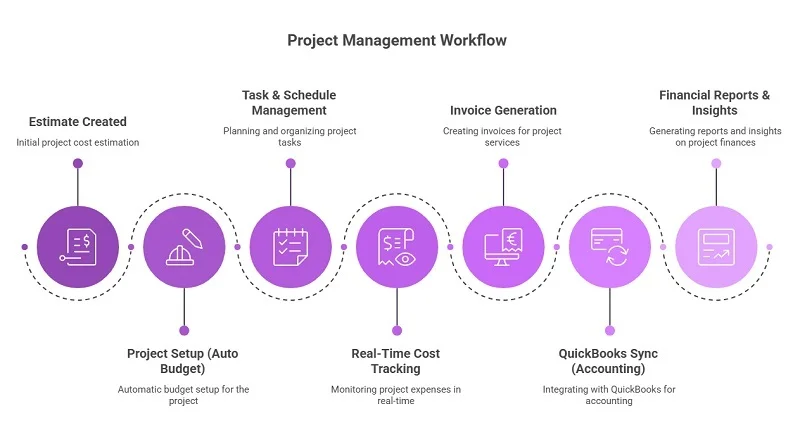
Everything just flows naturally from one phase into another with no missing pieces, no redundancies, and no waiting periods.
Disconnected vs Integrated Construction Workflow (Comparison)
| Workflow Element | Disconnected Systems | Integrated Workflow |
| Data Entry | Repeated across tools | Entered once and reused |
| Project Visibility | Limited | Real-time and complete |
| Cost Tracking | Delayed and inconsistent | Accurate and immediate |
| Invoicing | Manual and error-prone | Automated and accurate |
| Financial Insights | Outdated | Real-time |
| Team Alignment | Fragmented | Fully aligned |
Now, let us compare an integrated workflow with a disconnected one to understand the difference between them:
Efficiency: When duplicate data entry and manual intervention is removed from processes, teams are able to dedicate more time to higher-value tasks. Projects flow through processes with fewer bottlenecks.
Transparency: When all your data is connected, everyone has access to the same information. Communications between departments improve, and everyone can be confident they are working from accurate data.
Accuracy: Integrating your software reduces the risk of errors due to data being entered more than once. Financial reporting is more reliable; job costing is greatly improved.
Better Project Control: Builders have more control over their budgets, schedules and resources. Issues can be caught and resolved before they affect the bottom line.
FAQs: QuickBooks Integration for Construction Project Management
- Why do I need an integrated solution?
It is important because project management and accounting need to interact closely in order to provide accurate and insightful data.
- Can QuickBooks perform project management functions?
No, this is not the purpose of QuickBooks.
- What are the biggest inconveniences of disconnected workflows?
Duplication of efforts, inconsistent and inaccurate data, and delays caused by unnecessary manual actions.
- How does an integrated workflow affect invoicing?
Invoices become automatic and are generated based on project progress and estimated costs.
- Is this solution for small contractors as well?
Sure, any contractor can make their workflow much more convenient and efficient.
- How quickly can we achieve results?
Improvement in efficiency will take effect very fast.
Final Thoughts
Managing construction projects and finances separately is no longer sustainable for growing businesses.
By connecting project management workflows with accounting systems like 123worx builders can improve accuracy, reduce delays, and gain complete visibility into their operations.
If you’re looking to streamline your construction workflow and eliminate disconnected systems, solutions like 123worx provide a practical way to connect projects, costs, and financial data in one place.
Therefore, siloed tools and manual work will only create many headaches for you in the future.
But with our integration services, you can now connect all of your processes and gain visibility and control over them.
If you are currently working with disconnected construction software, then we have a solution that can help you.

As a Vice President at 123worx, Construction Management Platform, Bharat Rudra has worked with hundreds of business executives searching for best-suited software for their construction business with a wide array of requirements. Bharat takes pride in helping construction businesses solve their business and project management challenges. Feel free to reach Bharat if you have any questions. You can find him on LinkedIn or reach him at brudra@123worx.com